


How to Resize Image for CUET UG Application 2026?
Students applying for Common University Entrance Test are often confused about how to use CUET UG image compressor. As per the latest NTA CUET 2026 notification, the CUET UG application photograph must be between 10 kb to 200 kb, and the signature size must be between 10 kb to 50kb.
This Story also Contains
- CUET UG Image Compressor
- How to use CUET UG Image Compressor?
- CUET Image Size Reduce
- Change CUET Photo Background
Students are required to complete the CUET UG image compress process before starting filling out the application. Documents such as photograph, signature, identity proof, category certificate, if not uploaded in correct format and size may get the application form cancelled in the later part. Students are advised to read the entire article to learn more about the process of CUET UG image compress, document size, format and other important details related to CUET UG.
CUET UG Image Compressor
The National Testing Agency has specified a guideline for CUET UG image compressor. This guidelines mentions the file size and format for photograph, signature, identity proof and certificate required during the filling out of CUET UG application form 2026.
CUET Image Size and Format
Document Type | Required Format | File Size Range | Key Requirements |
Passport Size Photograph | JPG / JPEG | 10 kb to 200 kb | Recent color photo; 80% face visibility (including ears); white background; no mask |
Signature | JPG / JPEG | 10 kb to 50 kb | Must be clearly legible. |
Identity Proof | JPG / JPEG | 10 kb to 200 kb | For those not using Aadhaar or DigiLocker; must be clearly legible. |
Disability / UDID Certificate | 50 kb to 300 kb | Required for PwD/PwBD candidates; must be clearly legible |
How to use CUET UG Image Compressor?
Candidates are advised to follow these steps for CUET image compress. For example, if you need to the photo to 3.5 cm x 4.5 cm in pixels, here are the steps
Visit any image resizer website (example, imageresizer.com)
Upload your image
Set the setting as mentioned below
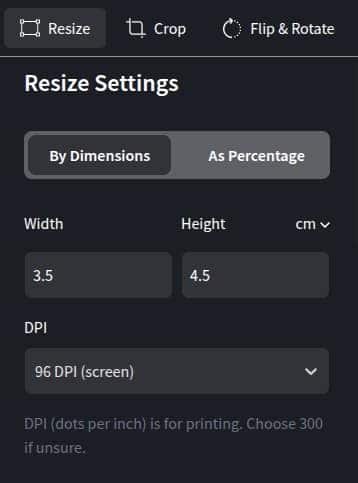
Set the target file size to 90KB
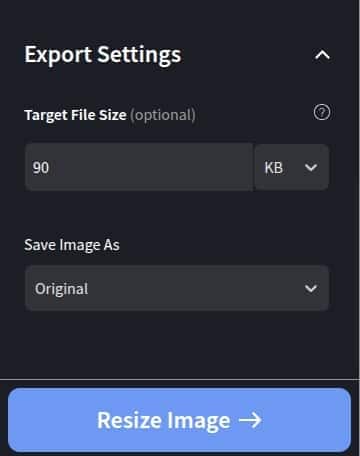
Then, click on “Resize image” to complete the process.
Note: You can follow the same steps for you signature.
CUET Image Size Reduce
In case your image size is more than the CUET UG specified size, candidates are advised to follow these steps
Go to any PDF file reducer website (example: ilovepdf.com)
Upload the PDF file
Choose the compression level (preferably extreme in case of larger file size)
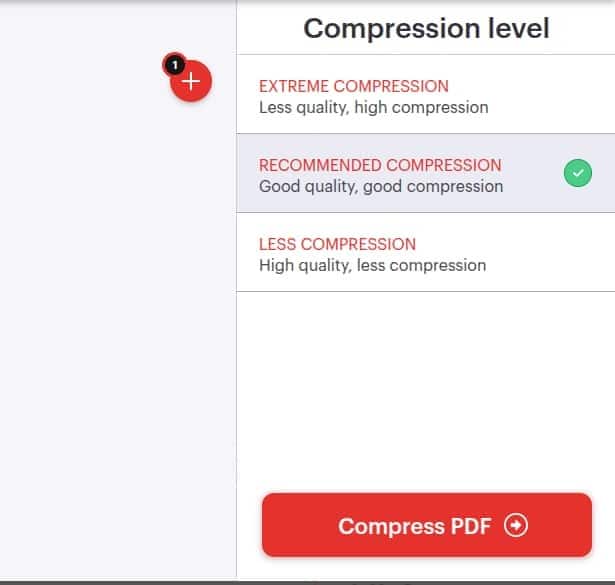
Click on “Compress PDF” and download
Change CUET Photo Background
For CUET 2026 registration form, students need to upload their photographs in white background, with at least 80% of their face visible. Here is how you can change your photo background.
Go to any background remover site (e.g. remove.bg)
Upload your photo
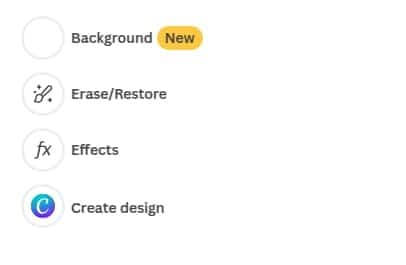
Then, click on the “Background” option
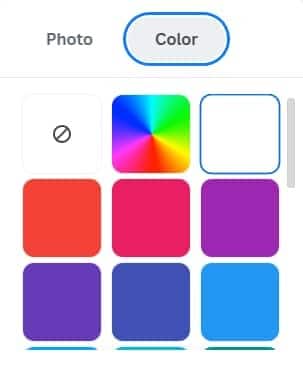
Then choose white as a background colour
Download the image
Note: After uploading the document, students are advised to pay attention to the status box on the right side, any specification mismatch will be displayed. Students are then required to remove that and upload the image which falls under the requirement set my the NTA.
Frequently Asked Questions (FAQs)
The photograph for CUET application form must be between 10 kb to 200 kb,with at least 80% face visible, white background and no mask.
The photograph for CUET application form must be between 10 kb to 50 kb, in JPG/ JPEG format and it must be clearly legible.
Students are required to upload their CUET UG form photograph in JPG/ JPEG format.

Popular Courses and Specializations
Popular Degrees
Popular Branches
List of colleges accepting CUET
Questions related to CUET
On Question asked by student community
Hey there,
Haan, Delhi mein bina CUET admission mil sakta hai, lekin Delhi University (DU) ke regular UG courses mein generally CUET mandatory hai. DU ke 2026–27 bulletin ke mutabik regular UG admission CUET-UG score par based hai. Delhi University (https://www.du.ac.in/uploads/2026/06012026_BOI_UG_2026_27_compressed.pdf?utm_source=chatgpt.com)
Bina CUET ke options
-
DU ke kuch specific vacant-seat/non-CUET
Dear Student,
You can access CUET PG previous-year question papers on Careers360. Practising past papers can help you understand the exam pattern, question types and difficulty level.
CUET PG Previous Year Question Papers
Dear Student,
Please refer to the link provided below:
https://university.careers360.com/articles/cuet-pg-question-papers
If you need any other resource, do let us know.
Hello, with a CUET score of 420 and OBC category, you can still participate in the BHU counselling process if you have registered and meet the course eligibility. Admission to B.Sc. courses in MMV or FCM depends on the course-wise cutoff, category, seat availability and counselling round. Since the first
Hello Dear Student,
Yes, entrance exams are required for a Bachelor in Audiology and Speech-Language Pathology (BASLP) course at many institutions, though admission policies vary. While some colleges admit students based on Class 12 merit, prominent institutes accept national or university-level entrance scores like NEET UG, CUET, AIISH Entrance Examination,